Virtual dress up for shopping
Dress up games are play. Trying clothes on a photo of yourself before you buy is the grown-up version, and it is useful if you know what to look for.
Buying clothes online means guessing. The product photo shows the piece on a model with a different body, under studio light, often styled with things you do not own. Virtual dress up, or AI try-on, swaps the model for you: you upload a photo of yourself and a photo or shop link of the garment, and you get back a picture of you wearing it. It is the same idea as the photo dress up game on this site, except the doll is you.
Used well, it answers some questions that product photos cannot. Used badly, it gives you false confidence about questions it cannot answer at all. Here is how to tell the difference.
What a try-on photo is good at
- Color next to your face. A mustard sweater can look great on a hanger and less so next to some faces. Seeing it right under your own chin is a quick way to compare.
- Pattern scale. Bold stripes, big florals and tiny checks all read differently at your size than on the product model. A try-on shows whether a print overwhelms you or disappears.
- The overall shape of an outfit. Wide trousers with a chunky knit, a cropped jacket with high-waisted jeans: proportions are easier to judge on a body than in your imagination.
- Whether it goes with what you own. Try the new piece with the jeans or skirt you already wear most. If the outfit only works with things you would also have to buy, that is worth knowing first.
What it cannot tell you
- Size and fit. The try-on does not know your measurements or the brand's size chart. It shows how the piece would look fitting you reasonably, not whether a medium will close at the waist. Always check the size chart, and the shop's fit notes and reviews about sizing.
- Length on your body. Sleeve and leg lengths are adjusted to look natural in the photo. Real inseams and sleeve lengths are numbers on the product page; compare them with a piece you own that fits.
- Fabric and feel. Stretch, weight, scratchiness, warmth and how see-through something is are all invisible in a picture.
- True color. Screens and shop photos both shift color. Treat the try-on as "this family of color is worth trying", not as a precise match.
Why seeing it on a body changes the decision
Here are the mint wide-leg trousers with the yellow sweater on the three people in the game. Same trousers, same sweater, three different-looking outfits. On Jun the sweater hangs over the waistband and the trousers fall straight. On Ama the sweater is tucked in, so the high waist and the long wide legs take over. On Rosa a front tuck shows off the pleats. A product photo on a single model would show you only one of these, and probably not the one closest to you.
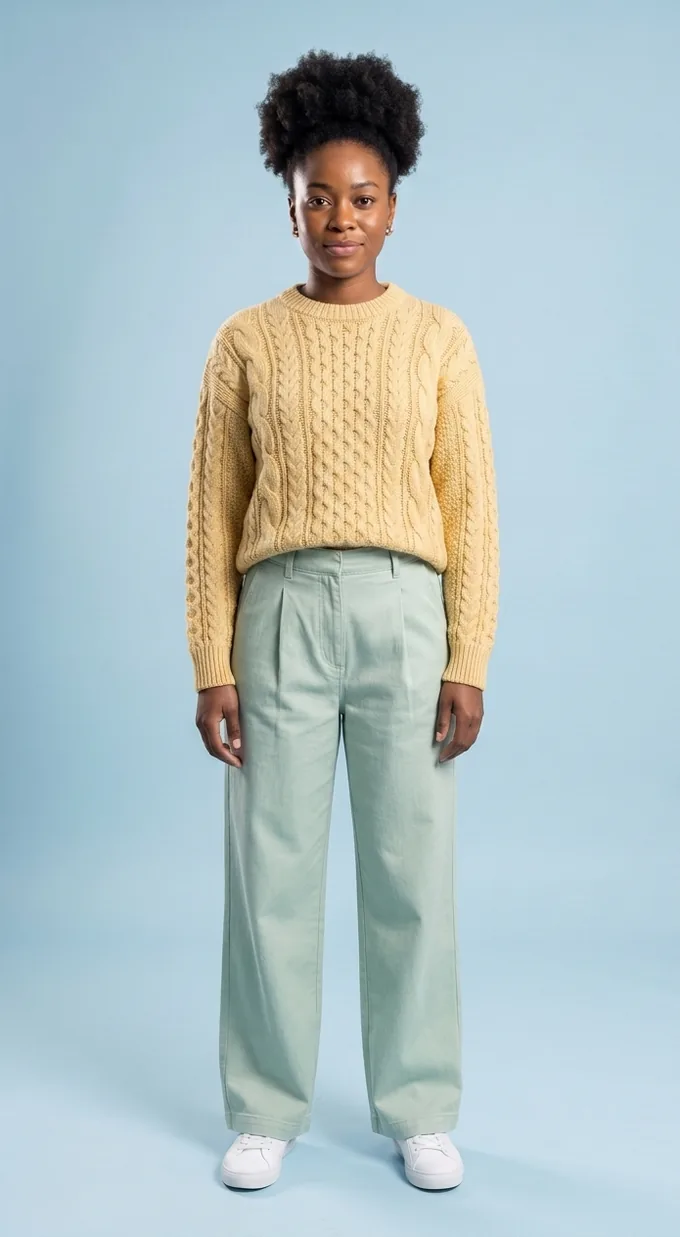
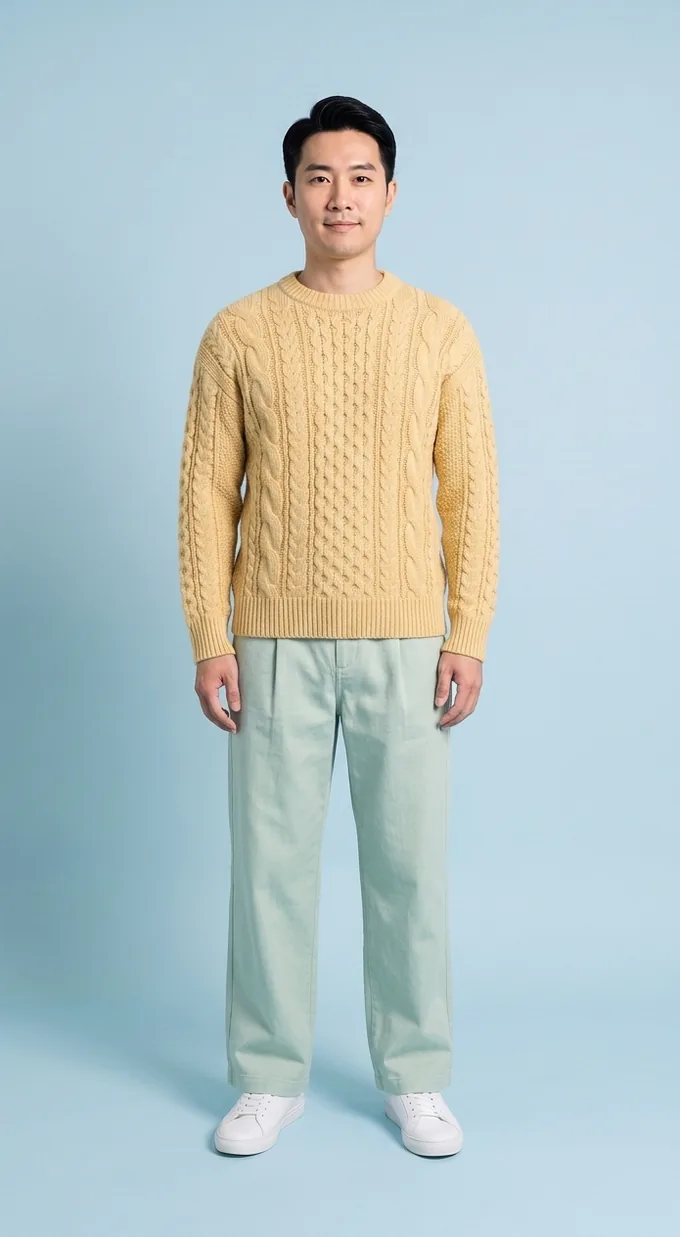
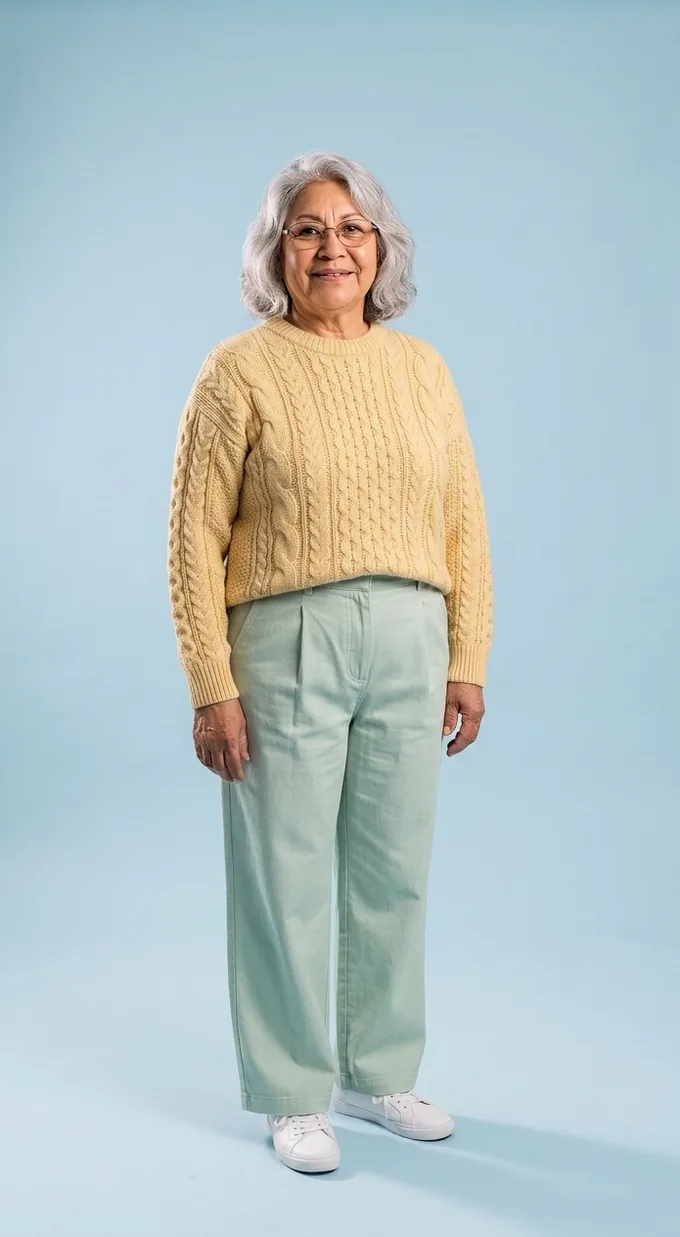
AI try-on examples. Ama, Jun and Rosa are AI-generated models, not real people.
A simple routine before you buy
- Shortlist first. Save the two or three pieces you are actually deciding between. Trying on twenty things is fun; it is also how you end up buying none of them, or all of them.
- Use one good photo of yourself. Stand straight, facing the camera, in fitted plain clothes (a plain tee and leggings or slim trousers work well) in even daylight. Full length if you are trying trousers, skirts or dresses; waist up is enough for tops.
- Try each piece with something you own. Pair the new top with your usual jeans. If the try-on lets you add more than one garment, add the bottoms you would really wear.
- Look at it the next day. First impressions of a new color are unreliable. If you still like the photo tomorrow, that means more.
- Then do the boring part. Check the size chart against a piece you own that fits, read the fabric content, and check the return policy before you pay.
Getting a better result from your photo
Try-on tools work by replacing the clothes in your photo, so the photo matters more than anything else.
- Show the whole garment area. Arms crossed over your chest or a bag over your hip hide the part the try-on needs most.
- Wear something fitted and plain. A baggy hoodie hides your shape, so the try-on has to guess where your body is.
- Even light, plain background. Harsh shadows and busy rooms make the result look pasted on.
- Use a clean product photo. One garment, front view, plain background. A photo of a model wearing five layers makes it unclear which piece you mean.
When it is most worth doing
Try-on earns its keep on the pieces where looks are the open question: a color you have never worn, a bold pattern, a statement coat, a shape you are unsure about, like wide-leg trousers or a cropped jacket. It is least useful for things where fit is everything and looks are a given, like a plain black T-shirt in a brand you already wear.
If you just want to plan outfits from clothes you already own, the outfit maker is quicker. And if you want to see how the try-on behaves before you use your own photo, play a few rounds of the dress up game and read how it was made.
Now dress up your own photo
Thinking about buying something? Upload a photo of yourself and a photo or shop link of the garment, and FitInView generates an image of you wearing it. It is the same AI try-on that made every look in this game.
Your first try-on is included with a free account. No card needed.